
Microsoft Defender for Endpoint Part 7: Attack Surface Reduction in
Attack Surface Reduction (ASR) blocks attacker behaviors before execution, helping prevent phishing, credential theft, and living-off-the-land attacks.

From Detection and Response to Preventive Endpoint Hardening
Your threat hunters just discovered malicious PowerShell commands executing in your environment. After investigation, you realize these attacks could have been prevented entirely if risky behaviors had been blocked before execution.
What if you could stop attacks at the entry point instead of racing to contain them after they’ve already started?
This is where Attack Surface Reduction (ASR) transforms your security posture from reactive to preventive.
In Parts 1–6, we built a comprehensive Microsoft Defender for Endpoint foundation—covering architecture, deployment, alert management, incident response, automated investigation, and proactive threat hunting. You’ve learned how to detect and respond effectively once threats appear.
In Part 7, we focus on preventing those threats from executing at all.
What Is Attack Surface Reduction?
Attack Surface Reduction represents all the behaviors attackers abuse to compromise endpoints. ASR rules are built-in Microsoft Defender for Endpoint controls that block risky behaviors, even when the malware itself is completely unknown.
Unlike traditional antivirus, ASR doesn’t ask:
“Is this file malicious?”
Instead, it asks:
“Is this behavior dangerous?”
Examples include:
Blocking Office applications from creating child processes
Preventing credential theft from LSASS
Stopping executable content from email clients and webmail
Key takeaway:
ASR focuses on behavior, not malware signatures.
Why Attack Surface Reduction Matters
Modern attackers increasingly rely on:
PowerShell and scripting engines
Windows Management Instrumentation (WMI)
Living-off-the-land binaries
Legitimate administrative tools
These techniques often evade traditional antivirus because the tools themselves are trusted—the behavior is malicious.
ASR rules directly target these tactics. By blocking risky behaviors that legitimate applications rarely need, ASR prevents attacks before detection and response workflows are even triggered.
This shift from “detect and respond” to “prevent and protect” is critical. In phishing-driven intrusions especially, ASR can be the difference between a blocked attempt and a ransomware incident.
Question:
Does your environment still allow unrestricted PowerShell or Office macro execution today?
Understanding ASR Rule Categories
Microsoft groups ASR rules into strategic categories based on the attacker techniques they prevent.
1. Office and Productivity Application Rules
These rules prevent abuse of trusted applications such as Word, Excel, and Outlook. They block Office apps from creating child processes, injecting code, or executing obfuscated content—critical protection against phishing-based initial access.
2. Script and Command-Line Rules
These target PowerShell, JavaScript, VBScript, and other scripting engines commonly abused in post-exploitation. They stop obfuscated scripts, suspicious command-line usage, and fileless malware techniques.
3. Credential Protection Rules
These defend against credential theft attempts targeting Windows security subsystems. The most important rule blocks access to LSASS, preventing tools like Mimikatz from dumping credentials and disrupting lateral movement.
4. Persistence and Execution Rules
These prevent attackers from establishing or maintaining persistence, including blocking WMI event subscriptions, executable content from email clients, and abuse of vulnerable signed drivers.
5. Ransomware-Specific Rules
These focus on behaviors commonly used by ransomware, such as untrusted processes accessing removable media or performing suspicious file encryption patterns.
Key takeaway:
Each ASR category targets attacker tactics, not specific malware families.
Standard Protection Rules: Start Here
Microsoft recommends three ASR rules as a baseline due to their high protection value and low false-positive rates:
Block Credential Stealing from LSASS
Prevents processes from accessing LSASS memory, stopping credential dumping, pass-the-hash attacks, and lateral movement techniques.
Block Abuse of Exploited Vulnerable Signed Drivers
Stops “Bring Your Own Vulnerable Driver” (BYOVD) attacks used to disable security controls or escalate privileges.
Block Persistence Through WMI Event Subscription
Prevents stealthy persistence mechanisms that survive reboots and are rarely used by legitimate software.
Most organizations can enable these rules directly in block mode with minimal risk.
You can learn more about here: Attack surface reduction rules reference
Question:
Are these three rules enabled across all of your endpoints today?
ASR Deployment Modes
ASR rules support four operational modes:
Disabled
The rule is fully off—no logging, no blocking. Use only when a rule causes unavoidable business disruption.
Audit
Logs events that would be blocked without enforcing. This is your primary testing mode and should be used extensively.
Block
Actively prevents the behavior and generates alerts. This is the intended production state.
Warn
Blocks the behavior but allows user override with a warning. Useful where user judgment is required.
Recommended progression:
Audit → Review → Block (or Warn)
Key takeaway:
Audit mode prevents outages. Block mode prevents attacks.
The Ring Deployment Strategy
Recommends a phased deployment using rings:
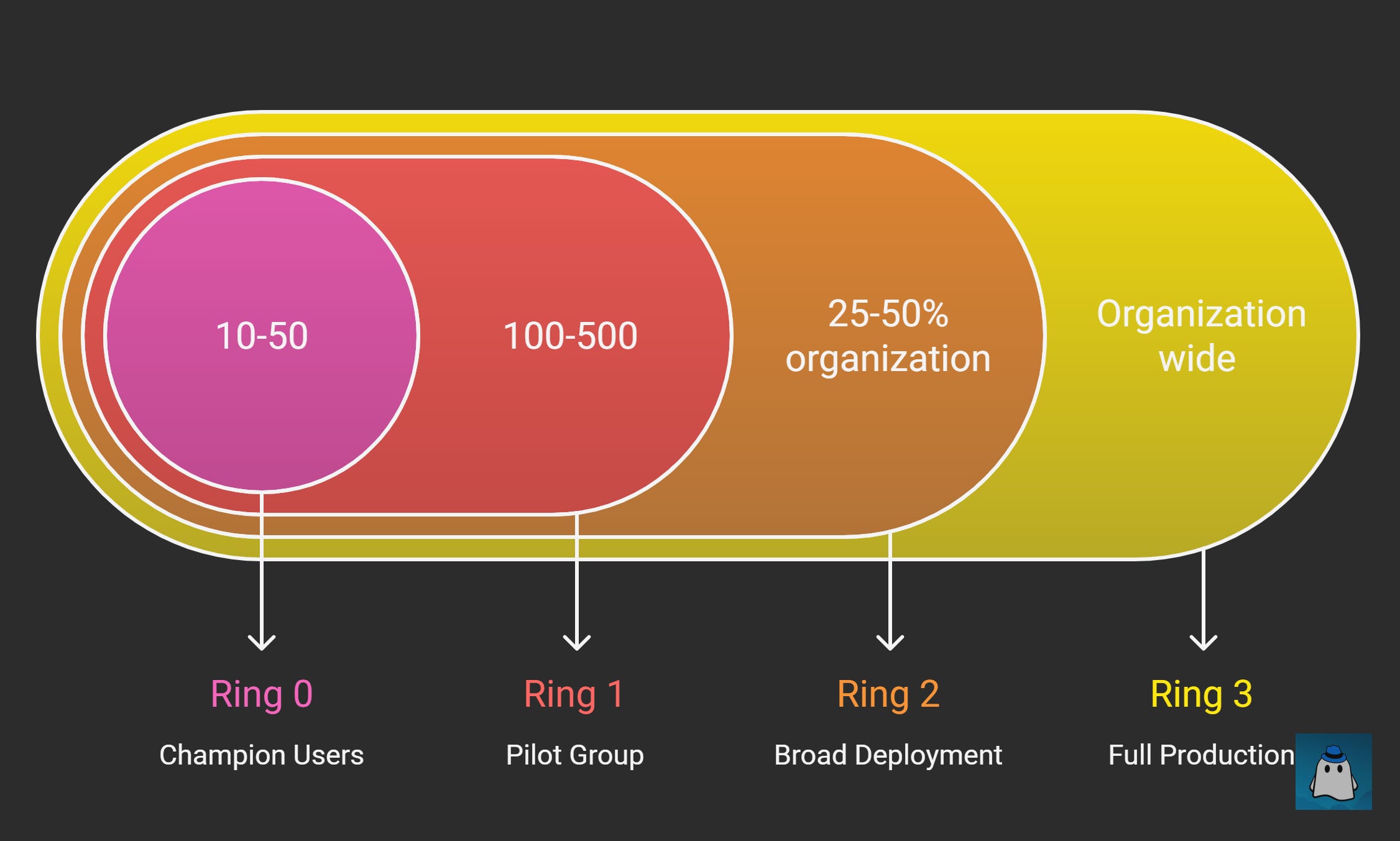
Ring 0: Champion Users
10–50 IT-savvy users. Deploy all rules in audit mode for 1–2 weeks to identify obvious issues.
Ring 1: Pilot Group
100–500 users across diverse roles and applications. Begin moving stable rules to block mode.
Ring 2: Broad Deployment
25–50% of the organization. Most rules should be enforced with validated exclusions.
Ring 3: Full Production
Organization-wide deployment with high confidence and documented exclusions.
Key takeaway:
If ASR deployment feels risky, your rings are too large.
Configuring ASR Rules through Intune
For cloud-managed environments, Intune is the recommended deployment method.
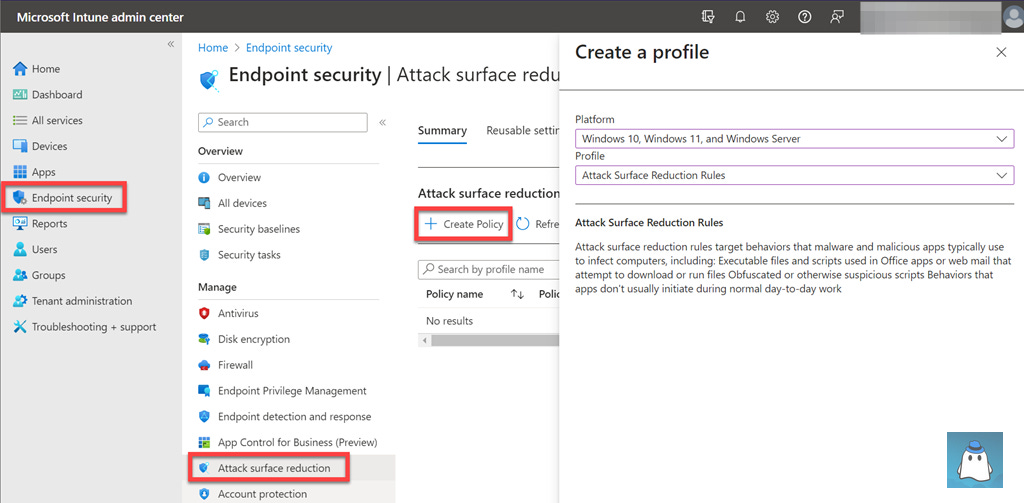
Navigate to Intune admin center → Endpoint security → Attack surface reduction → Create policy.
Select Windows 10 and later and Attack surface reduction rules.
When creating exclusions:
Always use full file paths
Avoid broad or wildcard exclusions
Prefer per-rule exclusions over global ones
Ensure Defender Antivirus is active with real-time and cloud-delivered protection enabled. ASR does not function in passive mode.
Monitoring and Tuning ASR Rules
Use the Attack Surface Reduction report in the Microsoft Defender portal to monitor:
Rule configuration status
Detection trends
Device-level events
Audit mode events appear as “Would have blocked”. Block mode events represent actual prevented attacks.
Investigate each trigger:
Legitimate behavior → create scoped exclusion
Malicious behavior → investigate further
Creating Strategic Exclusions
Exclusions should be precise and temporary.
File and Folder Exclusions
Always use absolute paths. Avoid directory-wide exclusions.
Per-Rule Exclusions
Apply only to the specific rule causing issues to maintain protection elsewhere.
Certificate-Based Exclusions
Useful for trusted vendors with consistent signing practices.
Document every exclusion with justification, approver, and review date.
Common ASR Implementation Challenges
Browser updates accessing LSASS
Backup software triggering ransomware rules
Poorly designed line-of-business apps
Administrative tools like PsExec or Sysinternals
Balance security with operations, but avoid blanket exclusions.
ASR Best Practices
Start with standard protection rules
Use audit mode generously
Deploy incrementally through rings
Monitor continuously
Document exclusions
Communicate with users
Integrate ASR into change management
Key takeaway:
ASR succeeds when security and operations work together.
Measuring ASR Effectiveness
Track:
Block rate
Rule coverage
Exclusion count
Mean time to exclusion
Prevented incident count
Document blocked attacks to demonstrate security value.
What’s Next
With ASR rules deployed, you’ve added a preventive security layer that blocks attacks before execution.
In Part 8, we’ll explore Next-Generation Protection, covering:
Microsoft Defender Antivirus
Cloud-delivered protection
Behavioral and ML-based detection
Threat intelligence integration
Together, ASR and Next-Gen Protection form the front line of endpoint defense.
Join the Conversation
Which ASR rule caused the most friction in your environment—LSASS, WMI persistence, or Office child processes?
Share your experience in the comments.
Subscribe to CyberBoo to receive practical, real-world Microsoft Defender guidance and more in-depth cybersecurity content you can apply immediately.
